Node JS Mobile Application Development: Everything You Need to Know
312 Views
Summarize Article



Summarize Article
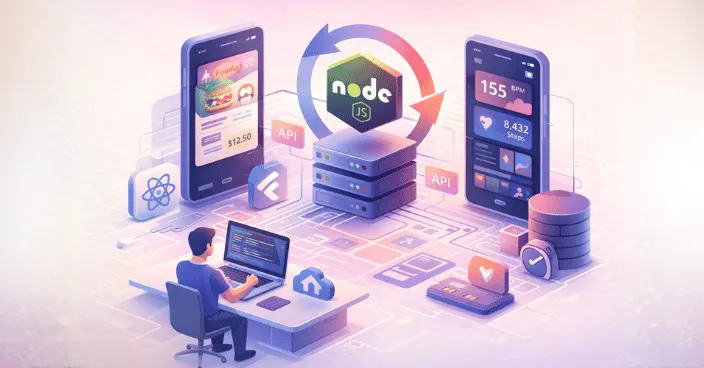
If you are planning node JS mobile application development for your next product, it can feel hard to see where Node.js really fits. Does it power the app screens or just the backend? How does it compare to other stacks?
Node.js remains one of the most commonly used web technologies, cited by about 40–50% of surveyed developers in recent Stack Overflow surveys.
WebOsmotic works with teams that ask these questions daily, so let us walk through Node.js in a clear, practical way.
A typical node JS application, like many other mobile app technologies, runs on the server. It listens for requests, talks to a database and sends data back to your mobile or web client. For mobile, this usually means:
So node JS mobile application development does not mean writing the on screen UI in Node.js. It means using Node.js as the engine that feeds your mobile app with data and logic. WebOsmotic often designs projects where one clean Node.js backend supports React Native or Flutter apps so teams do not duplicate work.
If you want a deeper view of how Node powers APIs and real time features behind mobile products, this guide explains the process and walks through the full picture
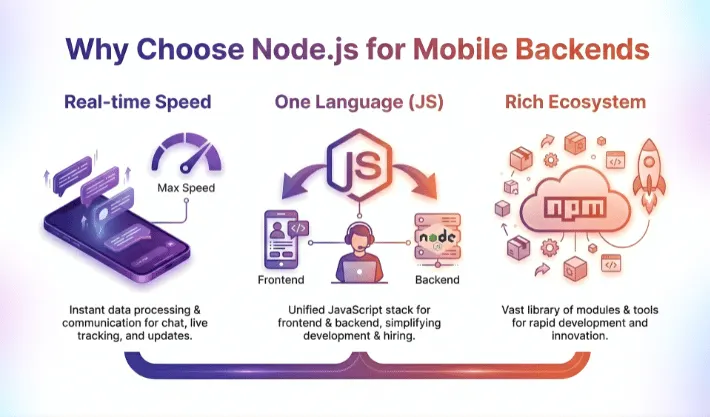
Node.js became popular because it is fast to build with and uses JavaScript on the server. That gives a few strong benefits for mobile teams.
Companies like Netflix, Uber, PayPal, LinkedIn, Walmart and eBay run key backend systems on Node.js for speed and scalability.
A skilled node.js application development company like WebOsmotic can pick the right mix of tools so your backend stays simple and still has room to grow.
Node.js powers tens of millions of websites and is used by over 262,000 companies across the world.
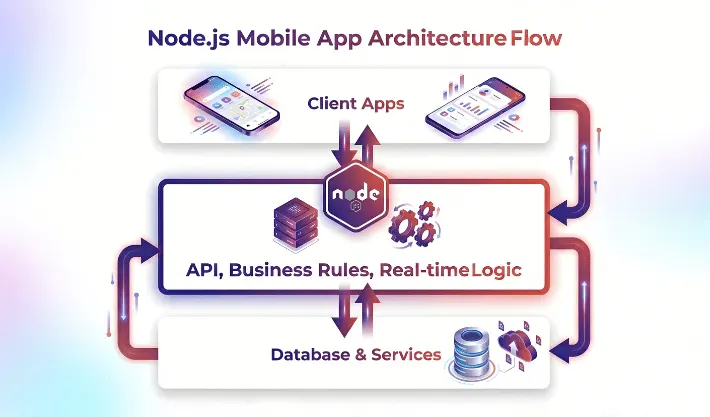
At the development process, it helps to decide if your APIs will run on Node JS mobile app backends or another stack, based on traffic and real time needs To understand node.js mobile application development, think of three simple layers.
When all three work together you get a smooth node JS mobile application development flow. Clients stay light, Node.js stays focused on rules and data, and the database stays safe behind that layer. WebOsmotic usually adds logging and monitoring so you can see how each piece behaves in real time.
It helps to picture a real node JS mobile app example instead of only reading theory. Here are a few simple cases.
These are plain node JS mobile application development examples, yet they cover many common needs. You see logins, real time updates and secure payments. Node.js fits well in each case because it handles many small requests quickly and can scale with traffic.
Node.js is not magic, yet it shines in certain mobile scenarios.
Choose it when you:
In these cases, Node.js gives you speed in build and clarity in structure. WebOsmotic often combines Node.js with cloud services, so autoscaling and deployments stay smooth as usage grows.
There are also times when Node.js is not the perfect fit. For heavy data crunching or CPU bound tasks, other languages can perform better. You can still use Node.js at the edge and push intense jobs to worker services in a different stack.
If your team is deeply invested in another language and has strong mobile experience around that stack, forcing Node.js just for trend value does not help. A good partner like WebOsmotic will look at your current strengths before suggesting a backend. The goal is a stable product, not a checklist of tools.
WebOsmotic usually starts with a workshop. The team maps key flows, user journeys and spike traffic points. Then they design a Node.js architecture that matches those patterns. That might mean simple REST for most screens and a focused real time channel for chat.
The advantage of working with a node.js application development company is that you do not carry every decision alone. WebOsmotic already has patterns for auth, role based access and basic observability. Your product gets tested building blocks and still keeps room for custom rules.
Node.js fits the modern mobile world as a fast, flexible engine behind your apps. It keeps business logic and data in one place so both iOS and Android clients can stay light and focused on the user. With the right design you get clean APIs, smooth real time features and a stack your team can understand easily.
If you want that mix of speed and structure for your next mobile product, WebOsmotic can plan and ship your Node.js mobile application development roadmap, then stay with you as the app and the user base grow.
Can Node.js build the actual mobile screens?
Node.js does not render native screens. It powers the backend APIs. For UI you use tools like React Native or platform native code and connect them to your Node.js application.
Is Node.js good for large scale mobile backends?
Yes, with the right design. Many high traffic products use Node.js for APIs and real time features. Scaling depends on clean code, proper caching and good infrastructure decisions.
How do I pick a Node.js application development company for my mobile project?
Look for teams with real mobile projects in their portfolio, not just simple sites. Ask for node JS mobile app example case studies and check how they handle support after launch.
Can I move an existing backend to Node.js later?
It is possible. Many teams migrate parts of their system over time. You can start with new services in Node.js, connect them to the old core, then shift more functions once they prove stable.