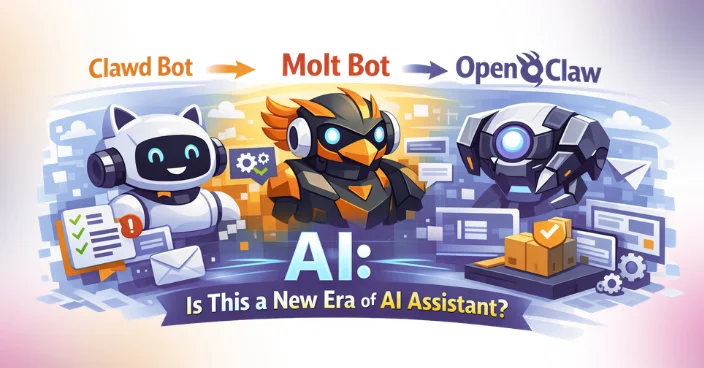
Clawd Bot to Molt Bot and Now Open Claw AI: Is This a New Era of AI Assistant?
106 Views
Summarize Article



Summarize Article
A funny thing happens with new tools. The name changes first, then the story changes, and then people start arguing about what the tool even is. That is basically the path many users saw with Clawd Bot, then Molt Bot, and now Open Claw.
If you only heard the names in group chats, it can feel like a new bot pops up every week. But the more useful question is this: what is Open Claw actually trying to do, and why are people paying attention now?
This blog breaks it down in plain US-facing language, with the practical bits teams care about: what it does, where it works well, what can go wrong, and how to decide if it belongs in your stack.
A lot of “new” assistants are not brand-new products. They are the same idea getting packaged again so it is easier to ship, easier to explain, or easier to trust.
In public posts and third-party guides, “Clawd Bot” shows up as an earlier label tied to chat integrations. “Molt Bot” shows up as another label people use around the same concept. Today, “Open Claw” is the name most people use when they talk about the current direction.
So, instead of treating these as three separate things, it helps to treat them as one ongoing attempt: make an assistant that can live inside real workflows, not just inside a demo chat box.
Open Claw is generally presented as an open-source assistant that can connect to the places people already work. Instead of asking users to switch tools, it aims to meet them on messaging channels and then complete tasks via tools, APIs, and system actions.
In simple terms, Open Claw sits in the middle of three parts:
That is why people talk about it like an “assistant,” not just a chatbot. The goal is less small talk, more task completion.
Name changes usually happen for boring reasons, and boring reasons matter.
A cute name can get attention, but teams want a name that signals what it does. “Open Claw” reads more like a product umbrella than a single chat bot.
Once a bot is used in public groups, the bar rises fast. People start asking about data handling, permissions, and abuse. A rename often comes with a stronger “we are taking this seriously” posture, even if the core code stays similar.
If a tool moves beyond one chat app, the old name can feel too narrow. A broader name helps when the same assistant is deployed on more than one surface.
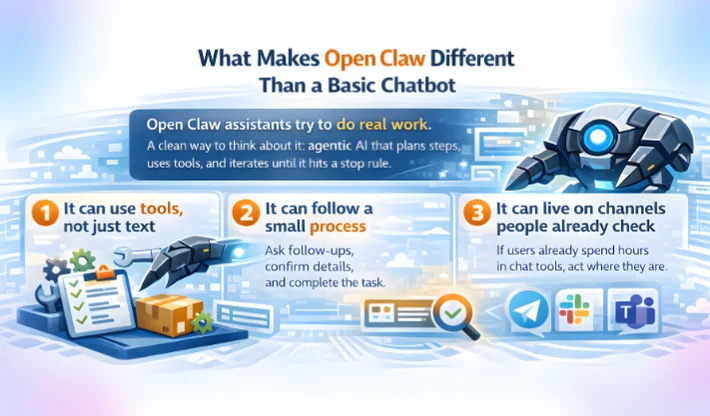
A basic chatbot answers questions. Open Claw-style assistants try to do work. A clean way to think about Open Claw is as agentic AI, since it can plan steps, use tools, and iterate until it hits a stop rule.
Here are the practical differences teams notice:
When a bot can trigger actions, it starts saving time. Examples include creating tickets, pulling order status, drafting replies, summarising long threads, or pinging the right owner in Slack-style workflows.
A good assistant does not just answer one prompt. It can ask for a follow-up, confirm a detail, and then complete the task. That simple loop is where many bots fail and where agent-like assistants get useful.
If users already spend hours on chat tools, putting the assistant there reduces adoption friction. That is one reason the “Clawd Bot Telegram” angle gained attention.
Open Claw tends to make the most sense when you need fast help inside messy, human workflows.
Support teams often waste time on repeats: “Where is my order?” or “How do I reset access?” An assistant can handle the first pass, gather key details, and route the case with cleaner context.
Teams deal with product titles, attributes, and FAQ style updates at scale. An assistant can suggest edits, flag missing fields, and help keep listings consistent. It also helps when you want best practices for optimizing product descriptions for AI shopping assistants, since those descriptions need clear structure and fewer vague claims.
Sales, onboarding, and success teams all have the same pain: “Where is the latest doc?” If the assistant can search your internal knowledge base and return a short answer plus a link, adoption gets easier.
If you do not need a heavy automation platform, a chat-first assistant can handle small tasks that still matter, like checking a status, generating a draft, or summarising a call note.
If a tool can act, it can also mess things up. That is not drama. It is a normal engineering reality. If privacy rules and audit needs are part of the rollout, this generative AI for regulatory compliance guide helps teams set boundaries early.
The moment you connect tools, the bot needs scopes. If you give broad scopes “just to make it work,” you will regret it later. Start tight. Expand only after real usage proves a need.
A tool that looks free can still generate costs via model usage or API calls. Third-party guides that talk about “hidden API costs” are pointing at a real issue: token spend plus tool calls can grow quietly.
If conversations contain customer data, you need a clear policy on storage, retention, and access logs. Even a small bot in a shared chat can create a compliance headache if the defaults are unclear.
Once a bot is used by many people, it can get pulled into topics it was never meant to handle. That is when moderation and guardrails stop being optional. A recent news-style writeup about OpenClaw chatbots “running amok” shows how quickly public perception can flip when bots behave badly in the wild.
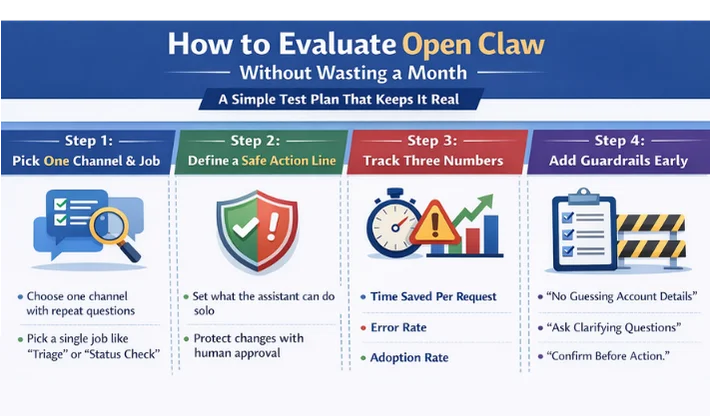
Here is a simple test plan that keeps it real.
Do not start with five channels and ten tasks. Pick one channel where people already ask repeat questions, and pick one job like “triage,” “status check,” or “draft reply.”
Decide what the assistant can do without approval, and what needs a human click. Drafting text is safer than changing live data. Fetching info is safer than deleting anything.
Track: time saved per request, error rate, and adoption rate. If those do not move, the tool is not helping yet.
Add basic rules like “do not guess account details,” “ask clarifying questions on missing IDs,” and “confirm before action.” That prevents embarrassing outcomes.
If you need a build with tight permissions, action approvals, and clear logs, see this AI agent development company page.
It can be, but not because the name changed.
The “new era” part is this: assistants are moving closer to the work. They are not just answering questions. They are living inside chat, connecting to tools, and completing small tasks that actually reduce workload.
If Open Claw keeps its focus on practical workflows and sane guardrails, it can be genuinely useful. If it becomes a hype bot that tries to do everything, it will burn trust fast.
A good way to think about it is simple: Open Claw is not magic. It is a system design choice. If you design the system well, the assistant feels like a helpful teammate. If you design it loosely, it feels like a risk.
If you want an Open Claw-style assistant built with clean UX, tight permissions, and a rollout plan your team will actually use, WebOsmotic can help you scope it and ship it in a controlled way.
1) Is Open Claw the same thing as Clawd Bot?
Many third-party guides describe Clawd Bot as an earlier label tied to chat integrations, with Open Claw being the broader current name. Treat it as the same direction, just packaged differently.
2) What is Molt Bot in this story?
“Molt Bot” shows up in community and third-party references as another naming phase people used around the same assistant idea. The key is the workflow goal, not the label.
3) What can an Open Claw assistant actually do?
It can answer questions, but the real value comes when it can use tools and complete tasks in a controlled way, like drafting responses or pulling internal status data.
4) What is the biggest risk with chat-first assistants?
Permissions and data exposure. If the assistant can access sensitive tools or shared chats, you need clear access rules and strong logging.
5) How do you start small with Open Claw?
Pick one channel and one repeat job, keep actions behind approval at first, then expand only after usage proves value.