Native vs Progressive Web Apps: Core Comparison
81 Views
Summarize Article




If you run product calls today, native vs progressive web apps is a question that comes up almost every time. Both can look modern. Both can feel fast. The hard part is knowing which one fits your users, budget and roadmap.
The global PWA market was already worth about $1.46 billion in 2023 and is projected to grow at roughly 31.1% CAGR through 2030, which shows how quickly teams are betting on this approach
WebOsmotic talks through this choice with founders a lot, so let us walk through the basics in simple language.
Before diving into progressive web apps vs native app, let’s clear the basics first. Native apps are built for one platform at a time. You have an iOS build and an Android build. Users install the app through a store. The app can use device features like camera, push alerts and sensors with deep control.
A progressive web app runs in the browser yet behaves more like an app. It can work offline in some flows, send basic notifications and sit on the home screen. You update it on the server, and every user sees the new version once they load it again.
Many teams search for progressive web app vs native and land in long opinion threads. Instead of loud opinions, it helps to line up the tradeoffs on a calm list.
If you want to see where PWAs shine in day-to-day use, we have covered the key benefits of progressive web apps in more detail.
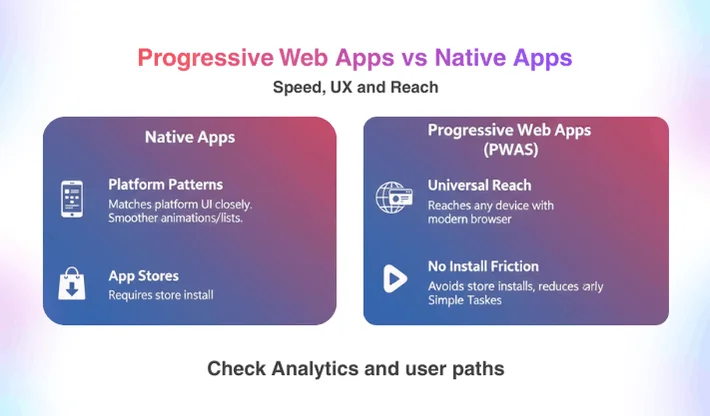
On brand new phones, both can feel quick. The difference shows up in small edges.
Native apps:
PWAs:
If your product lives in daily habits such as banking or chat, users often expect a full native feel. For lighter tools such as booking portals or content hubs, a well built PWA can feel more than enough. WebOsmotic checks analytics and real user paths before quoting one as better.
The native vs progressive web apps debate often hides money questions under tech talk. You need to see how many builds and teams you will manage over the next few years.
With native builds, you have:
With a PWA you have:
That does not mean PWAs are always cheaper. Heavy offline logic, complex caching and custom device support can still cost time. Yet for many early products, progressive web apps vs native app choices lean toward web when budget is tight and timelines are short. WebOsmotic often starts there, then adds native later once the product proves itself.
For budgeting and scoping, our guide to custom web app builds explains how complexity, integrations and team size shape long-term costs.
This is where native keep a clear lead.
Native builds can:
PWAs can handle many basics. They can cache content, send simple alerts and access camera and location in a limited way. Still, some sensitive or advanced features stay locked behind native APIs.
If your idea relies on rich camera work, health data or deep background tasks, progressive web app vs native app decisions tilt toward native quickly. WebOsmotic will highlight these hard needs early, so you do not discover them in the last sprint.
Thinking about progressive web app vs native app only in terms of features can be tricky. Use cases matter. PWAs shine when:
Use cases like booking platforms, learning products and internal tools often fit this pattern. In these situations, progressive web app vs native is less a fight and more a simple match check: browser access plus a solid PWA stack already covers most needs.
WebOsmotic designs PWAs with offline support for key screens, smooth add to home prompts and a look that still feels like a serious product, not a basic site.
You can pair these use cases with our overview of modern PWA frameworks to choose a stack that matches your product needs.
Around 90% of mobile internet time is spent in apps, and apps show 157% higher conversion rates than mobile websites.
On the other hand, progressive web apps vs native apps do not change one core truth. Native still wins when:
Think gaming, advanced media tools or health tracking that must work in the background while the screen stays off. Here, native on iOS and Android gives more reliable control than a PWA.
WebOsmotic does not push one route for every client. For some products, they build native apps first and bolt on a lighter web experience later for marketing traffic.
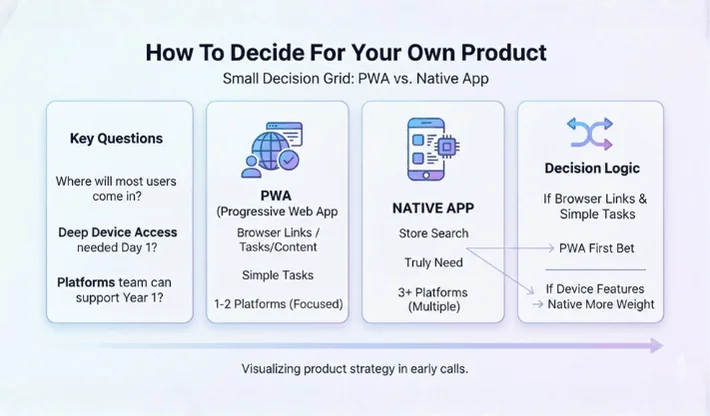
Instead of getting lost in threads about progressive web apps vs native app, use a small decision grid.
Ask three questions:
If most visitors arrive through links and your core value is content or simple tasks, a PWA is a strong first bet. If your value lives in device level features, native deserves more weight.
WebOsmotic often draws this grid on a whiteboard in early calls, then maps your features and traffic ideas onto it. The answer usually becomes clear in a few minutes once real constraints sit in the open.
The choice between these stacks is less about winning a tech argument and more about matching user behaviour, feature needs and team capacity. Native apps shine in deep device work. PWAs shine in reach and speed of change. Both can sit together in one long term roadmap.
If you want a partner who can weigh progressive web apps vs native apps with calm reasoning instead of buzzwords, WebOsmotic can help you map real options, build the right first version and keep doors open for the next stage of your product.
Is a PWA always cheaper than a native app
Not always. A simple native app can cost less than a very complex PWA with heavy offline logic. Cost depends on scope, not only on tech label.
Can a PWA replace a native app in app stores
You can ship wrapper builds that point to a PWA, yet store rules vary. For some categories, a fully native build still gives better visibility and trust.
How does performance compare in progressive web apps vs native apps
Native usually has a small edge in raw speed and smoothness, especially in graphics heavy flows. Well built PWAs can still feel very quick for content and standard CRUD tasks.
Can I start with a PWA then move to native later
Yes. Many teams do exactly that. You can reuse backend logic, design systems and even some front end patterns while building native clients later. Planning this early makes the shift smoother.