What Are SLMs And How Do They Work?
319 Views
Summarize Article



AI is no longer only “big models in the cloud.” A lot of real products now need responses in under a second, on a budget, with less data leaving the device or company network.
That is where SLMs come in.
SLMs are small language models. They are built to do useful language tasks while staying light enough to run faster and cheaper than giant models. They do not try to be a “do everything” brain. They try to be reliable workers for specific jobs.
If you have been hearing the term and wondering what SLMs are in practical terms, think of them as the model you use when speed, cost, and privacy matter more than being the smartest model on every topic.
SLMs meaning is simple: “small language models.” Small does not mean weak. It means fewer parameters, lower compute needs, and easier deployment on modest hardware.
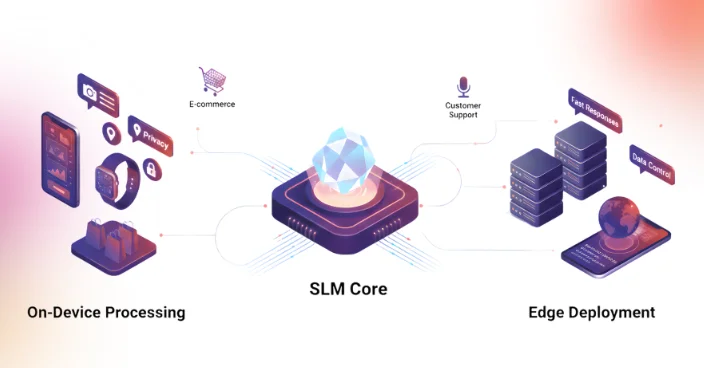
If you are comparing model families you can actually deploy, this open source LLMs guide will help.In many products, that trade-off is exactly what you want. A smaller model can still summarise, classify, extract, rewrite, and answer narrow questions well. It can also sit closer to the user, like on-device or inside your private environment, so the loop is quicker.
Microsoft’s Phi family is a well-known example of this direction, positioned as “small language models” designed to deliver strong quality at smaller sizes. Google’s Gemma 2 also includes smaller sizes like 2B, built to be efficient while staying useful for real tasks.
Meta’s Llama 3.2 includes lightweight text-only models (1B and 3B) intended to fit on certain edge or mobile setups. Apple’s OpenELM is another example of efficient models released in multiple small sizes.
Under the hood, SLMs still use the same transformer-style ideas you see in larger models. The big difference is how they are trained, tuned, and deployed so they stay compact and efficient.
A typical SLM setup works like this:
That last point is a big deal. Many teams think “bigger model = better answers.” In practice, “right context + smaller model” can beat a larger model that has no access to your internal truth.
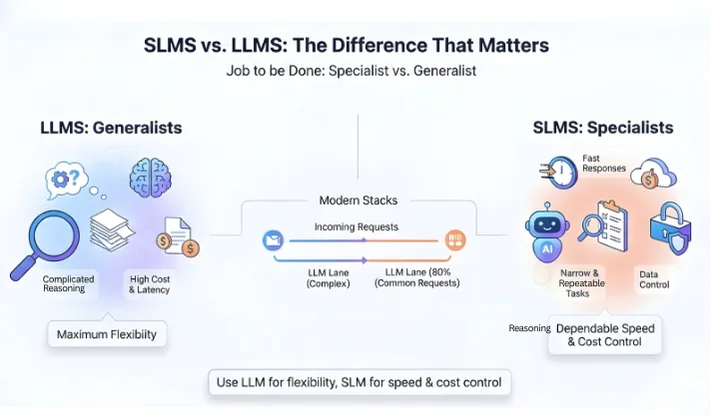
People usually compare SLMs vs LLMs using size alone. The better way is to compare the job they are meant to do.
LLMs are generalists. If someone on the team is still mixing definitions, this what is generative AI vs AI explainer clears it up fast. They can handle broad conversations, complicated reasoning, and messy tasks. They also tend to cost more per request and add latency, especially at scale.
SLMs are specialists. They shine when:
A clean way to think about LLMs and SLMs is: use an LLM when you need maximum flexibility, use an SLM when you need dependable speed and cost control.
Many modern stacks use both. A simple way to route tasks is to know how to use generative AI as the “LLM lane” baseline, then keep SLM lanes narrow. The SLM handles 80% of common requests. The LLM handles edge cases and complex asks.
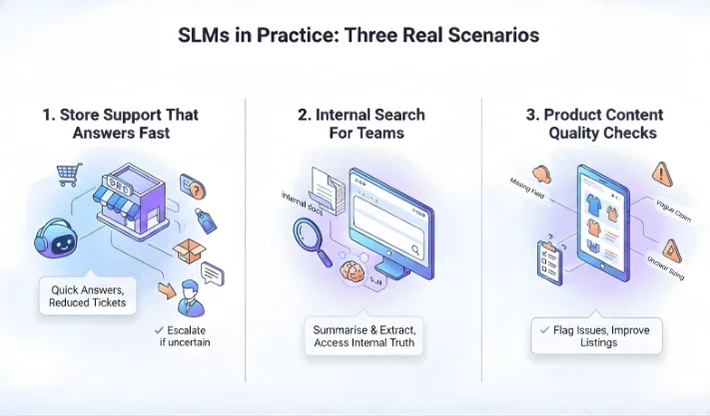
Teams often understand SLMs once they see real scenarios. Here are three that show why a smaller model can be the right pick. In each case, the key is tight scope and clear success checks. You are not asking the model to be a genius. You are asking it to be consistent, fast, and safe in one lane.
A small model can handle order questions, return steps, and product compatibility checks when it has access to policy text and order status. The user gets a quick answer, and support tickets drop. If the model sees uncertainty, it can escalate to a human agent.
SLMs can summarise internal docs, extract key points, and answer “where is that info” queries when paired with retrieval. This works well inside company tools because the model does not need broad world knowledge. It needs your internal truth.
In ecommerce, an SLM can scan product pages and flag missing fields, vague claims, or unclear sizing notes. That helps content teams fix listings that cause returns, without running an expensive model on every product daily.
“Best SLMs” depends on your constraints. There is no single winner for every team.
Here is a practical way to shortlist:
Start with where it must run. If you are budgeting the full system, this custom AI development cost guide helps set realistic targets. If you need edge or on-device, you will care about memory and quantisation support. If it runs on a server, you will care about throughput and concurrency.
Next, look at context needs. If your assistant must read long policies or long product specs, a model with a larger context window can help. Microsoft noted Phi-3 mini has variants with up to 128K context, which is unusually large for a small model class.
Then look at licensing, safety guidance, and ecosystem. Meta’s Llama 3.2 lightweight models (1B and 3B) are positioned for edge-friendly use, and the model cards explain usage and safety notes.
Google’s Gemma 2 includes smaller sizes such as 2B, and Google provides official release details and guidance for developers. Apple’s OpenELM family includes multiple sizes (270M up to 3B), aimed at efficiency research and practical deployment patterns.
A good WebOsmotic-style rule: shortlist 2 models, test them on your real prompts and real data, then pick based on latency, accuracy, and failure behaviour, not on internet rankings.
Small models can fail in predictable ways, and that is good news, because predictable problems are easier to guard.
One common issue is overconfidence. If the model lacks a key fact, it may still produce a smooth answer. The fix is retrieval plus refusal rules. If the system cannot find a trusted snippet in your docs, it should say so and ask a follow-up question.
Another issue is shallow reasoning on complex tasks. If the user asks something that needs multi-step logic, a small model may skip steps. In a hybrid setup, that is the handoff moment to a larger model.
Also watch evaluation drift. Teams test the model once, ship it, then change product catalogues or policies later. The model did not change, but the truth did. You need periodic checks.
Most teams do not struggle with the model choice. They struggle with the system around the model.
WebOsmotic helps teams design an SLM setup that is practical: tight scope, clean data pipelines, retrieval that pulls trusted context, and guardrails that stop confident wrong answers. If you want a hybrid design using llms and slms together, we can also map routing logic so the right model handles the right request, without blowing up cost.
SLMs are often used for summarising, classification, routing, product tagging, support replies, and internal search when paired with retrieval. They work best when the task is narrow and the output can be checked.
SLMs focus on speed, cost, and easier deployment. LLMs focus on broad ability and stronger reasoning. Many products use both, with the SLM handling common flows and the LLM handling complex edge cases.
They can be, if you ground answers in your own knowledge base, add refusal rules, and route risky questions to a human agent or a larger model. The system design matters more than the model name.
Decide deployment limits (device or server), context length needs, licensing, and latency targets. Then run a real test set using your own prompts and data. Pick the model that fails in the safest way, not only the one that wins a benchmark.
Yes. A common design uses an SLM for fast, low-cost answers and an LLM as a fallback for complex questions. This keeps cost stable while still covering edge cases.