5 Main Types of Artificial Intelligence
152 Views
Summarize Article



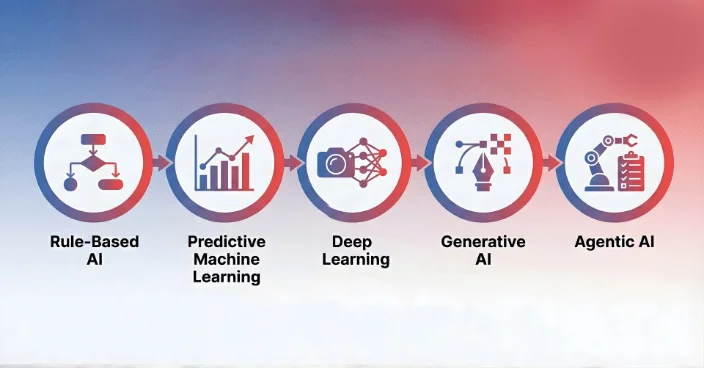
AI is a broad term, so it can feel confusing fast. One person says AI means chat tools. Another person means automation. Another person means predictions on a dashboard. All of them are talking about real things, but they are not always talking about the same thing.
Stanford’s 2025 AI Index reports 78% of organizations used AI in 2024 (up 55% in 2023). It also notes generative AI use in at least one business function rose to 71% (up 33% in 2023).
That is why it is important to understand the types of artificial intelligence in a practical way. Once you know the main buckets, you can pick the right approach, set the right expectations, and avoid building the wrong tool for the job.
This article uses a simple “what you can do with it” view, because it is the easiest way to apply in real projects.
Here are the 5 main types of artificial intelligence that show up in day-to-day business tools and software products. They often work together, but each type has a different strength.
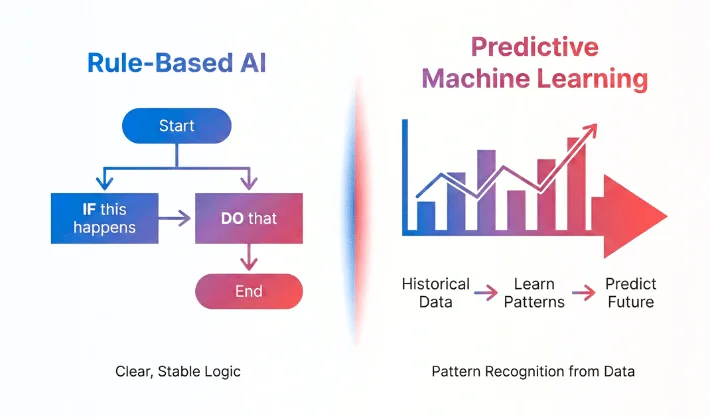
Rule-based AI is the simplest type. It follows fixed logic written by people. Think of it like “if this happens, do that.” : If your team keeps mixing terms like rules and models, this AI glossary helps keep language consistent.
A common type of artificial intelligence in older enterprise systems is a rule engine that routes tickets, flags policy issues, or approves simple cases.
It works best when:
A support workflow can auto-tag a ticket when it contains certain words, then assign it to the right queue. No learning happens here. It is still very useful because it is fast and consistent.
If the rules change often, maintenance becomes painful. If real life has many edge cases, rules can become a tangled mess.
Predictive machine learning learns patterns using historical data. Instead of fixed rules, it uses examples and outcomes to make a prediction.
This is what many people mean when they say “AI” in analytics. It answers questions like “what is likely next?”
If you want a clean comparison of prediction versus generation, read generative AI vs predictive AI.
It works well for:
An eCommerce team can predict which orders are at higher risk of return using past order behaviour and product attributes. The team can then adjust communication and policies before the return happens.
Predictive models depend on data quality. If labels are weak, the model will learn weak signals. If the data shifts, accuracy can drop quietly.
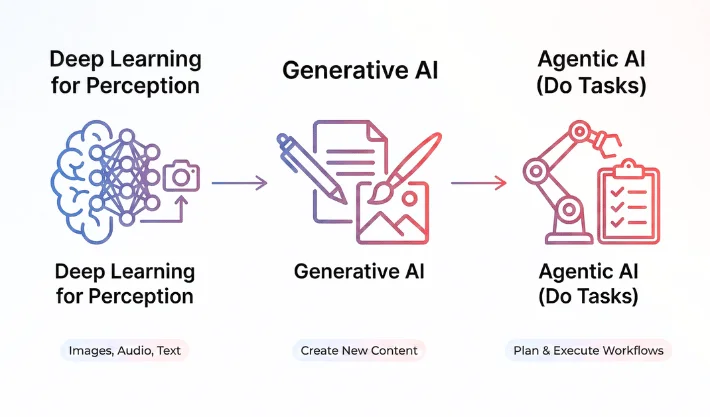
Deep learning is a subset of machine learning that is strong at perception tasks. It is commonly used for images, audio, text classification, and pattern-heavy inputs.
If you are turning perception into a real feature, artificial intelligence in web applications shows how teams ship it in products.
Deep learning is powerful, but it also needs more data, more compute, and careful evaluation.
It fits well for:
A manufacturing team can use camera feeds to detect visible defects. A deep learning model can spot patterns that humans may miss during long shifts, then route only suspicious cases to a human reviewer.
Deep learning can be hard to explain in simple terms. That is fine in some use cases, but risky in high-stakes decisions unless you add checks, monitoring, and audit trails.
Generative AI creates new content instead of only predicting labels or scores. This includes text generation, image generation, and code generation. This explainer on how generative AI works makes the limits and review steps easier to explain to teams.
This is the category that made AI feel “human” to many people, because it can write, summarise, and chat in a natural way.
It is useful for:
A product team can use a chat interface to turn internal notes into a user-friendly help article draft. A developer can use a coding assistant to generate a first version of a function, then review it and add tests.
Microsoft Research ran a controlled study and found developers using GitHub Copilot finished a coding task 55.8% faster than the control group.
People often ask about the types of generative artificial intelligence because this bucket is wide. In practice, teams use generative tools for text and images. They also use it for code and audio, depending on the product.
Generative tools can sound confident while being wrong. That means review and verification matter. If the content affects users or compliance, you need a clear approval step.
Agentic AI is the “do tasks” layer. It can plan steps, use tools, and keep working until it reaches a goal or a stop rule. It is not just a chat response. It is a loop.
This is a big shift because it can move work forward inside systems, not only suggest what a person should do.
It can help with:
An engineering team can set up an agent that reads a bug report, tries to reproduce it, runs tests, then proposes a patch in a pull request. A human still reviews and merges, but the repeated steps shrink.
Tool access needs guardrails. If an agent can write to production systems, mistakes can scale. The best setup uses limited permissions, full logs, and approval gates.
Gartner predicts over 40% of agentic AI projects will be canceled by end of 2027, citing costs, unclear value, or weak risk controls.
In real software, these do not sit in isolation. Most teams build a mix of capabilities, and that mix becomes one of several types of artificial intelligence systems.
Here is what that looks like in practice:
This is why planning matters. You are not choosing “AI.” You are choosing which pieces should exist and how they connect to users and processes.
WebOsmotic helps teams turn AI ideas into working product features with clear scope, measurable outcomes, and safe rollouts. That includes choosing the right model type, building the workflow around it, and setting up guardrails like logging and review gates.
If you are planning a new build or upgrading an existing platform, the fastest win is usually clarity: what the tool should do, how it will be measured, and how it stays safe at scale.
Most products use a mix of rule-based logic, predictive machine learning, deep learning, generative AI, and agentic AI. The right mix depends on the job, the inputs, and the risk level.
Not always. Rule-based systems are great when logic is stable and outcomes must be predictable. Machine learning helps more when patterns are complex and data can support learning.
It fits best in drafting and assistance tasks, like writing responses, summarising internal notes, and speeding up coding. It still needs review when accuracy matters.
Agentic AI can plan steps and use tools to complete tasks in a loop. It goes beyond answering a prompt and can move work forward inside a controlled workflow.
Start with the exact output you need, then check your inputs and define success metrics. Pick the simplest approach that meets the goal, then add safety steps based on risk.